
Reactive Index lets you sign in in two main ways:
- Sign in with Google (using zero-knowledge tech on zkSync)
- Sign in with a Sui wallet
This article explains both options in simple terms.
1. Sign in with Google (zkSync)
1.1 How to sign in
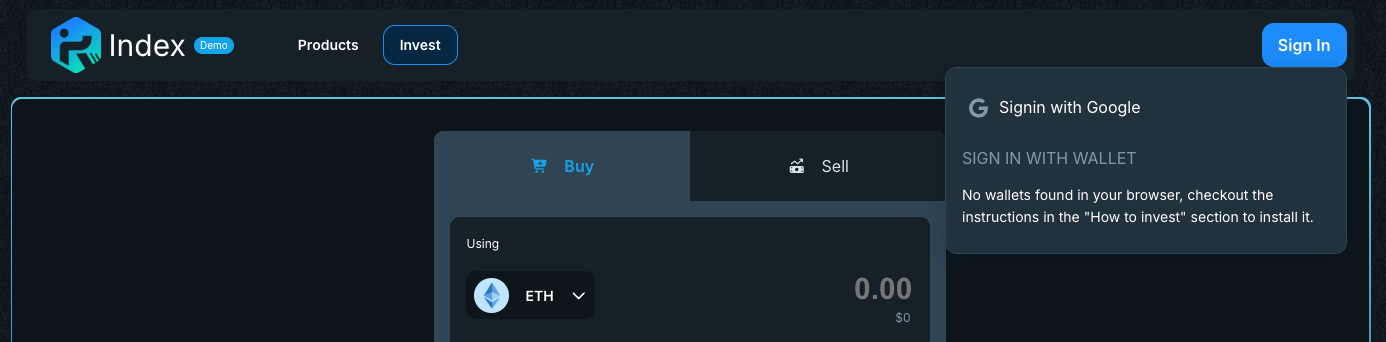
- Open the Reactive Index web app.
- Click “Sign in with Google”.
- A small Google window (pop-up) will open.
- Choose your Google account and confirm.
- You are redirected back to the app, now signed in and ready to use Reactive Index.
1.2 What is zkSync (explained simply)
-
zkSync is a Layer 2 network on top of Ethereum.
It batches many transactions together and sends them to Ethereum as a single proof. This keeps fees low and confirmations fast while still relying on Ethereum’s security. -
It uses zero-knowledge proofs: cryptography that proves “everything is correct” without revealing all the details of every transaction. This helps with both scalability and privacy.
You don’t need to understand the math. The key point is:
Your assets stay on a secure blockchain network; the Google login is just a convenient way to control a wallet there.
1.3 Where is my seed phrase?
With “Sign in with Google” on Reactive Index:
- You do not see or type a 12/24-word seed phrase.
- At the same time, Reactive Index, Google, and zkSync do not hold your funds for you like a bank.
Under the hood:
- A non-custodial wallet is created for you.
- Cryptographic keys that control this wallet are protected so they can only be used when you successfully prove “I am this Google user”.
- No one at Reactive Index or Google can move your funds on their own, because they cannot sign transactions without that proof.
In other words:
You keep full control over your wallet, even if you never touch a seed phrase directly.
You should still:
- Keep your Google account secure (strong password, 2FA).
- Keep recovery methods for your Google account safe (backup codes, recovery email, etc.), because access to this account is how you access your wallet.
⚠️ For Safari users
On Mac (Safari for macOS)
- Open Safari.
- In the top menu bar, click Safari → Settings… (or Preferences… on older macOS).
- Go to the Websites tab.
- In the left sidebar, select Pop-up Windows.
- In the list on the right, look for these sites:
https://app.demo.reactive.finacehttps://my.slush.app/
- For each site:
- Open the dropdown next to it and select Allow.
- If the sites are not listed:
- At the bottom, set When visiting other websites to Allow temporarily.
- Reload the Reactive Index page and try “Sign in with Google” again.
- Once it appears in the list, you can set back When visiting other websites to your preferred value.
On iPhone / iPad (Safari for iOS/iPadOS)
- Open the Settings app.
- Scroll down and tap Safari.
- Under the General section, find Block Pop-ups.
- Make sure Block Pop-ups is turned off (toggle is grey).
- Close Settings.
- Try “Sign in with Google” again.
If the Google window still does not appear, close all tabs, fully quit Safari, reopen it, and retry the flow after confirming that pop-ups are allowed.
2. Sign in with wallet (Sui)
2.1 What is a crypto wallet?
A wallet is:
- A browser extension or app that holds the private keys that control your blockchain accounts.
- Your way to:
- See your balances and NFTs on Sui.
- Approve or reject transactions.
- Connect to dApps like Reactive Index.
Important points:
- Wallets are usually non-custodial:
you control your keys, not the wallet company. - Your tokens and NFTs live on the Sui blockchain, not “inside” the wallet; the wallet is just your interface and your digital keyring.
2.2 How to sign in with a wallet
- Install a Sui-compatible wallet extension (see the list below).
- Create or import a wallet and keep your recovery / seed phrase safe and offline.
- Open Reactive Index and click “Sign in with wallet”.
- Choose your wallet from the list.
- Your wallet extension will ask you to connect and then to approve the login transaction.
- Once you approve, you are signed in with that Sui address.
2.3 Popular Sui wallets with browser extensions
Below are popular self-custodial Sui wallets that work as browser extensions and are commonly used to connect to Sui dApps:
- Slush — A Sui wallet: official wallet originally developed by Mysten Labs for Sui.
- Suiet: open-source, user-friendly Sui wallet focused on simplicity.
- Surf Wallet: smart wallet for the Sui network, with NFT and dApp support.
- Ethos Wallet: Sui-focused wallet with strong dApp and NFT discovery tools.
- Martian Wallet: self-custodial wallet supporting both Aptos and Sui.
- Nightly Wallet: multi-chain wallet with support for Sui, Solana, NEAR, Aptos and others.
- Backpack: multi-chain wallet that supports Sui alongside Solana, Ethereum and more.
Note
All of these wallets are non-custodial. When you create one, you will receive a recovery phrase. Anyone who has this phrase can control your funds, so:
- Write it down offline.
- Keep it in a safe place.
- Never share it with anyone or paste it into websites / chats.
3. Which option should I choose?
-
Choose Sign in with Google if you:
- Want the fastest, simplest onboarding.
- Prefer not to deal with seed phrases directly, but still want non-custodial control.
-
Choose Sign in with wallet if you:
- Already use a Sui wallet.
- Want to connect the same address you use in other Sui dApps.
- Prefer managing your own seed phrase and multiple accounts manually.
Both options give you full control over your assets; they just offer different user experiences.